
Get the parking review—not another dashboard to check.
What happens in our office parking lot after everyone goes home? We were curious—but not enough to spend our nights watching footage. This MODE demonstration explores how AI can turn camera observations into occupancy history and a useful review.
Read the example report (PDF)Discuss a reporting workflow →
A MODE-built demonstration, not a customer case study. The report analyzes a heatmap screenshot; an integrated BizStack Agent reporting workflow is the next step being developed.
We weren’t going to watch the parking lot overnight. But we were curious.
We set up an AXIS camera at our office. AXIS is a MODE partner, and our own parking lot gave us a practical place to explore a simple idea: AI can observe a camera feed around the clock, even when nobody has time to watch.
Which spaces get used after hours? Do occupancy patterns repeat across nights? We used BizStack to organize parking occupancy history, then created an AI-generated overnight review. The aim wasn’t to replace a parking attendant—it was to learn something we otherwise wouldn’t spend time measuring.
Which spaces show apparent occupancy across midnight?
The report turns that question into findings and specific checks, rather than asking someone to inspect a week of history from scratch.
What the example report identifies
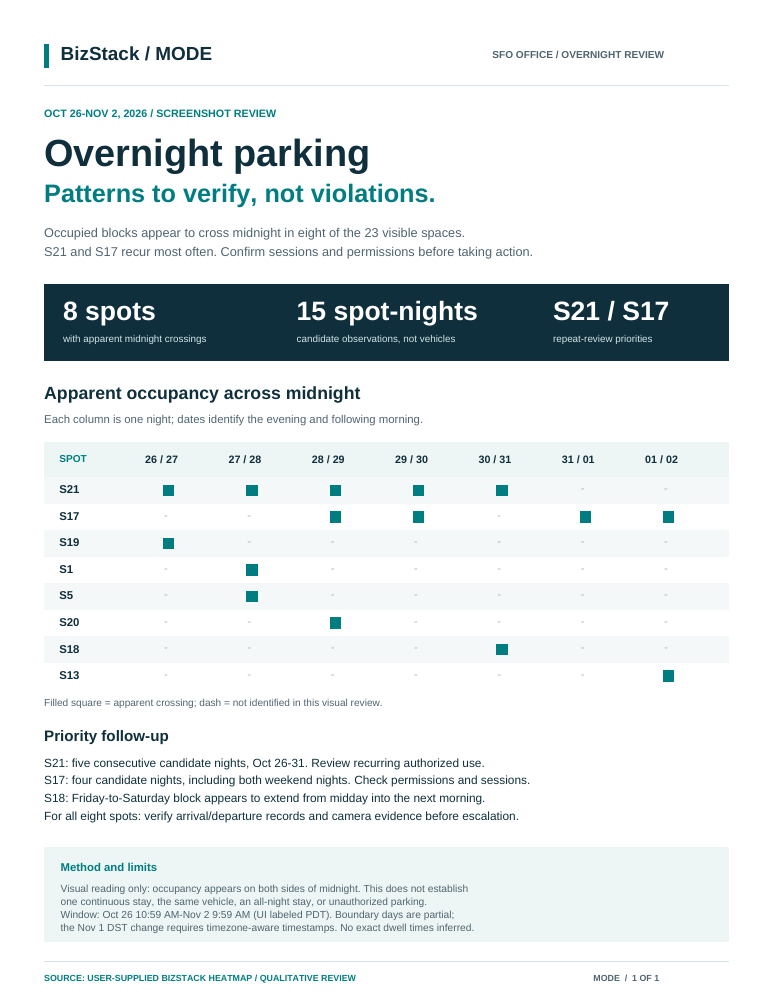
- Eight spaces with apparent occupancy across midnight.
- Fifteen candidate spot-nights across the review period—not fifteen vehicles.
- S21 and S17 as recurring review priorities.
Findings from the AI-generated visual review for Oct 26–Nov 2, 2026, not independently verified session-level facts.
The useful output is a report ready to review.
-
Capture activity
The numbered spaces in this parking camera view connect the physical lot to the rows in its occupancy history. The source heatmap below is the evidence used for the report.
Captured still from the demonstration, not a live feed or the exact frame for the reported overnight events. The camera view and source heatmap show different rolling time windows.
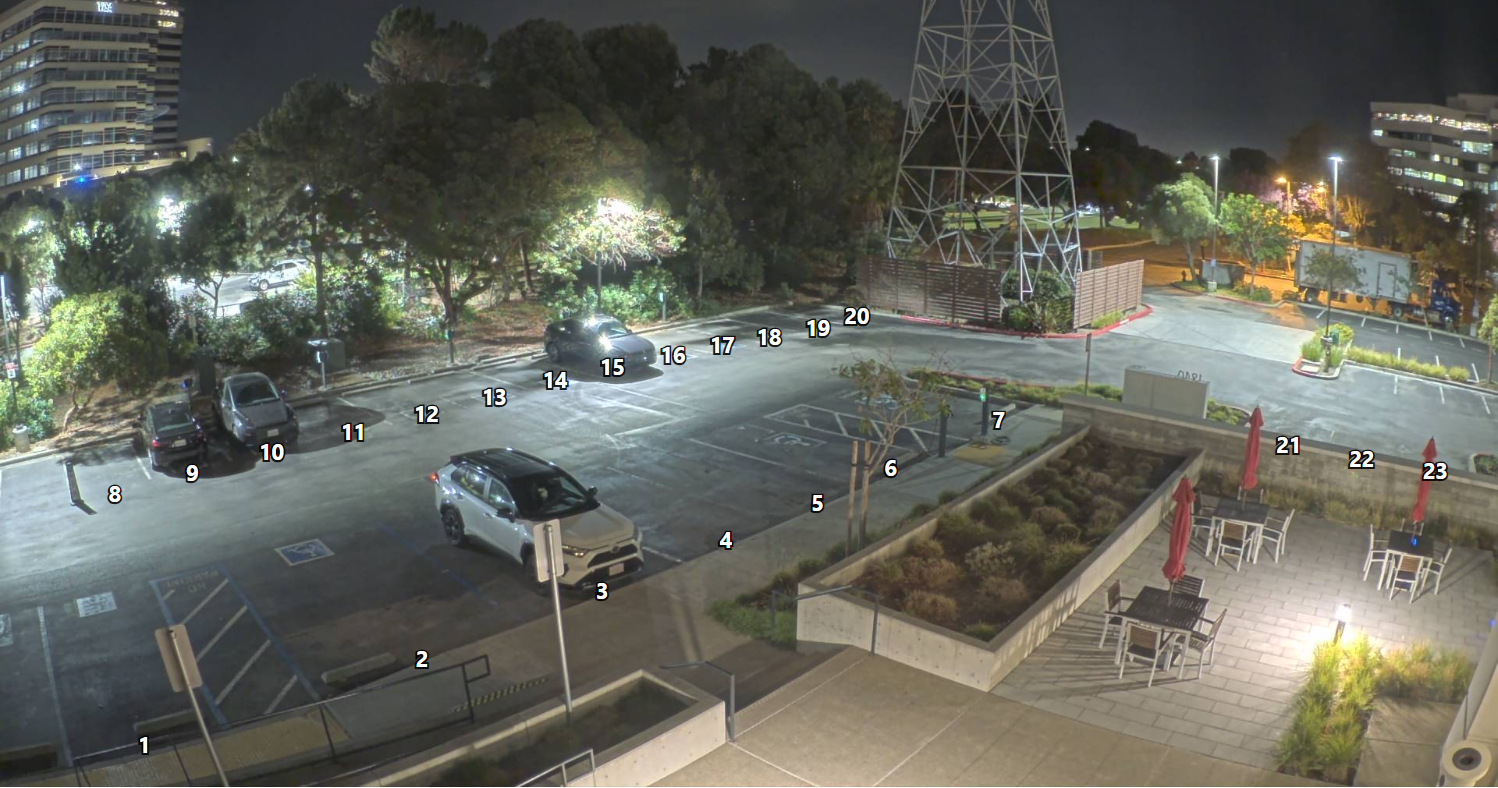
Parking camera view in BizStack, with numbered spaces corresponding to the occupancy history. View full-size camera still → -
Organize data on BizStack
BizStack organizes parking occupancy history by space and time. The heatmap makes usage patterns available for review and analysis, connecting observations of the lot to a structured history.
Each row represents a parking space; the time columns show how occupancy varies across the week. This is the organized-data layer supporting the example report.
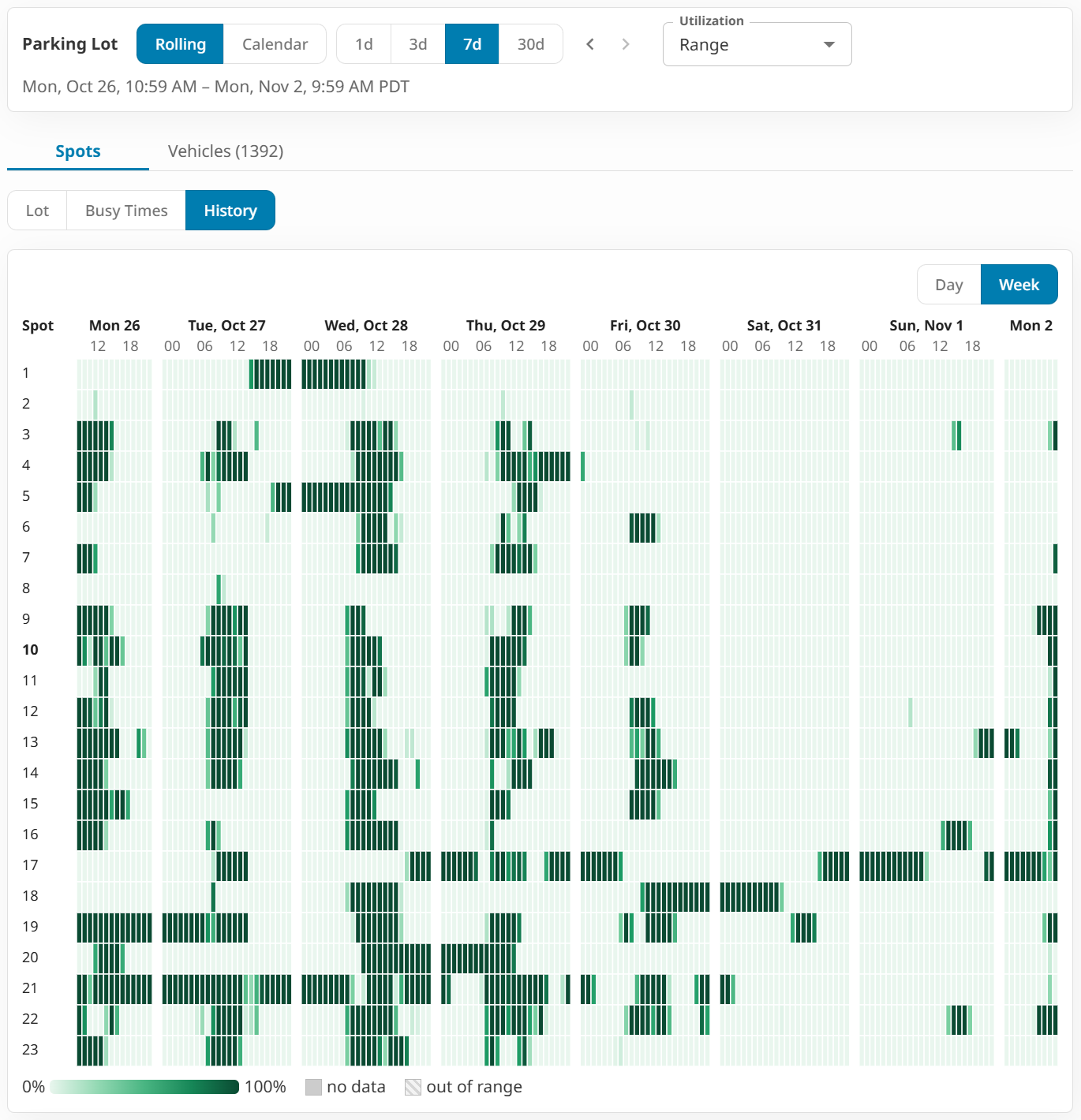
Parking occupancy data organized on BizStack by space and time. View full-size heatmap → -
Analyze patterns and prepare the report
The AI-generated review interprets the organized occupancy data shown in the heatmap, identifies apparent midnight crossings and recurring patterns, and brings the findings together in a one-page PDF for the team to review.
The actual AI-generated overnight review pairs apparent occupancy patterns with specific checks for the team. It keeps the evidence and its limits together.
AI-generated overnight parking review · Oct 26–Nov 2, 2026. Read the example report (PDF) →
Take recurring reporting off your team's plate.
The next step being developed is an integrated BizStack Agent workflow: reviewing usage history and preparing findings for your team. The goal is less manual compilation and report writing—not another screen to monitor.
Analysis is useful work in its own right.
A report can help the team decide what to verify without turning every pattern into an alert or task. People bring the permissions, schedules, and operational context needed to choose the next step.
The available example demonstrates an AI-generated review. It does not establish scheduled Agent execution, automatic delivery, spreadsheet integration, task routing, or production deployment.
Explore the BizStack platform →Which recurring review would you take off your team's plate?
Tell us what your team observes, how often you prepare a report, and which decisions it needs to support. We’ll discuss a practical first workflow.
Tell us about your reporting workflow →